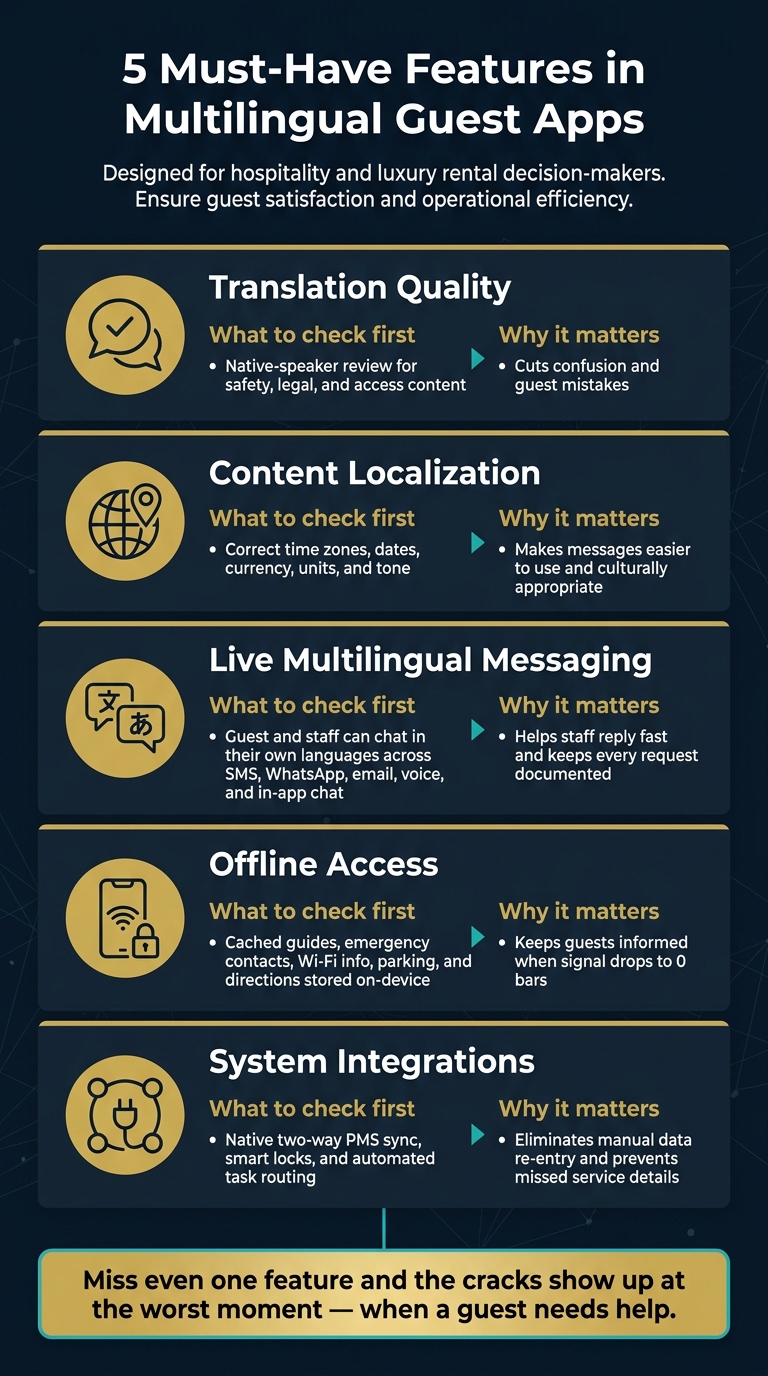
If a guest app misses even one core feature, your team ends up fixing avoidable problems by hand. When I look at multilingual guest apps, I focus on five things first: language quality, localized content, live messaging, offline access, and system integrations.
Here’s the short version:
- Translation has to be accurate for check-in steps, safety notes, and house rules.
- Localization has to go beyond word-for-word text and match dates, times, pricing, units, and floor labels guests expect.
- Guest communication has to work in real time across SMS, WhatsApp, email, voice, and in-app chat.
- Offline access has to cover core stay info like Wi-Fi, parking, directions, and emergency contacts.
- The app has to connect to PMS, locks, and service tools so staff are not re-entering data.
A weak app can look fine in a demo, then fail when a guest needs a code at 11:30 PM or when staff must update a rule across every message at once. That’s why I’d use this five-point check before picking any platform.
Quick comparison
| Feature | What I’d check first | Why it matters |
|---|---|---|
| Translation quality | Native-speaker review for safety, legal, and access content | Cuts confusion and guest mistakes |
| Localization | Correct time zones, dates, currency, units, and tone | Makes messages easier to use |
| Live communication | Guest and staff can chat in their own languages | Helps staff reply fast |
| Offline access | Cached guides, contacts, and directions on-device | Helps when signal drops |
| Integrations | Two-way PMS sync, smart locks, and task routing | Cuts manual work and missed details |
One stat says a lot here: if guests lose access to key stay details when service drops to 0 bars, the app has failed at the exact moment it matters most.
5 Must-Have Features in Multilingual Guest Apps
1. Language Coverage and Translation Quality
Supported Languages and How Updates Are Managed
Start with the languages your guests use most. That sounds obvious, but it’s where a lot of teams slip. In luxury rentals and event settings, a bad translation isn’t just awkward. It can throw off arrival details, access steps, and safety instructions.
That’s why central updates matter. If house rules, amenities, or safety notices change, those edits should flow everywhere at once. One change. Every channel updated. No guessing which version a guest saw.
Consistent Messaging Across App, Email, and Notifications
Mixed wording across channels creates problems fast. A guest reads one version in the app, another in an email, and something slightly different in a text. Now they’re confused, and your team gets pulled into damage control.
Push alerts, SMS, email, and in-app messages should stay in sync. The formatting should match U.S. standards too, especially for pricing and timing details. For example, $1,500.00 should appear that way across guest-facing messages.
Checklist: Questions to Ask About Translation Quality
Before you commit to a multilingual guest app, ask the vendor:
- [ ] Are check-in instructions, house rules, and safety notices reviewed by native speakers, not just machine translation?
- [ ] Is liability and legal language translated with professional oversight, not AI alone?
- [ ] Can language updates be managed centrally, so a single edit pushes to all channels at once?
- [ ] Does the app fall back to a default language when a translation is missing?
- [ ] Are currency symbols, date formats, and number formats localized correctly for each target audience?
Accuracy matters most when the message includes legal, safety, or access instructions. For safety notices, house rules, and liability language, use professional translation or native-speaker review.
Once language quality is steady, the next thing to check is whether every message stays localized across live guest channels.
sbb-itb-161ccc1
2. Content Localization and Real-Time Guest Communication
Localized Content That Matches Guest Expectations
After language accuracy, the next step is checking whether the app adjusts meaning, format, and tone to fit the guest’s location.
Translation changes words. Localization makes those words usable. That difference shapes clarity, timing, and guest confidence.
Localization should match tone, formality, and regional expectations. Use U.S. units the same way across the app, and make sure guest-facing formats display correctly. Floor labels need close attention too, because "ground floor" and "1st floor" don’t mean the same thing in every market. The same goes for practical directions that change from place to place.
Multilingual Chat, Requests, and Notifications
Once content feels local, the next test is live communication.
Live messaging is where localization matters most. The app should detect the guest’s language from the first message and keep the thread consistent, including push alerts, service confirmations, and schedule changes.
For luxury properties and events, time-zone-aware alerts are non-negotiable. This matters for arrivals, transfers, dining windows, and event schedules.
Guest messaging also needs to sync with live property data. A staff-reviewed AI draft adds a useful safety layer, especially for concierge confirmations, access instructions, and pricing.
Checklist and Communication Channel Comparison Table
Before finalizing an app, confirm these communication basics are covered:
- [ ] Can guests submit service requests in their preferred language without switching to a separate tool?
- [ ] Can staff and guests each see the conversation in their own language?
- [ ] Does the app support time-zone-aware scheduling for alerts and notifications?
- [ ] Can staff update localized templates without rebuilding the message flow?
- [ ] Does the app use fallback templates when a translation isn’t available, rather than sending a broken or untranslated message?
Choose channels by urgency, complexity, and guest behavior, not by feature count.
| Channel | Response Speed | Translation Clarity | Guest Convenience |
|---|---|---|---|
| In-App Chat | Instant | High (AI-powered, real-time translation) | High (no roaming fees, unified history) |
| SMS | Fast | Moderate (depends on device/carrier) | Very High (no app required) |
| Slow to moderate | High (best for long-form templates) | Moderate (requires inbox check) | |
| Voice AI | Instant | High (natural language processing) | High (hands-free, handles complex questions) |
Use the channel that fits the guest’s urgency, message length, and need for message history.
After communication, the next question is whether guests can still access core tools when connectivity drops.
Top 5 Guest Messaging Software in 2026 | HotelTechReport
3. Offline Access and Low-Connectivity Reliability
Offline access matters when guests lose signal on-site. Even the best multilingual messaging falls apart if guests can’t open the app when they need it. This happens more often than people think at remote ranches, coastal venues, and large event sites, where coverage can be weak or missing altogether.
If a guest can’t pull up check-in instructions or an emergency contact because the app needs a live signal, things can go sideways fast.
Content Guests Can Access Without a Signal
The main question is simple: what still works when there’s no signal?
Guests should be able to open key information offline, including:
- Check-in details
- Wi-Fi info
- House rules
- Parking instructions
- FAQs
- Emergency contacts
- Directions
- Evacuation guidance
That content should be stored locally in the guest’s chosen language, not just in English.
Lightweight Design and Pre-Download Options
Heavy apps are a pain. They load slowly, fail more often, and drain battery. That’s a bad mix in remote places where guests may not have access to a charger for hours.
It’s smarter to look for apps built with compressed media and lightweight code. Those apps tend to load faster and cache content more reliably.
Pre-download also matters. Guests should be asked to download content before they arrive. A pre-arrival message sent 24 to 72 hours before check-in gives them time to open the app while they still have a strong connection and save everything locally.
Checklist: Offline Readiness for Luxury Properties and Events
Before you commit to an app, check the basics:
- [ ] Can guests access preloaded language packs while offline, without a data connection?
- [ ] Is critical safety content – emergency contacts and evacuation guidance – stored locally on the device rather than fetched from a server?
- [ ] Does the app show a clear visual confirmation once offline content has fully downloaded and is ready to use?
- [ ] Are Bluetooth digital keys available for properties in dead zones, so guests can access their units without relying on Wi-Fi or cellular?
- [ ] Does the app send a pre-arrival prompt encouraging guests to cache content before they leave strong connectivity?
Next, verify that the app ties offline-ready content to reservations, access, and concierge workflows.
4. Integration With Property, Event, and Concierge Systems
A multilingual guest app does its best work when it plugs into the systems your team already uses every day: reservations, access, service teams, and scheduling. If those links are missing, staff end up typing the same details more than once, guest preferences get split across tools, and service starts to slip. Once the language side is handled, integration is what decides whether the app can do something useful with that message right away.
Connections for Reservations, Access, and Guest Profiles
The first thing to look for is a native, two-way connection to your Property Management System (PMS). That kind of sync lets the app pull live reservation details like guest names, check-in times, and unit info. It also lets the app post charges to the guest folio without staff having to key them in by hand. Just as important, it keeps a guest’s language preference attached to their profile, so that setting follows them across touchpoints and properties.
Smart lock integration matters too. When access credentials connect straight to reservation data, mobile keys can go out automatically at check-in. That cuts down front desk bottlenecks and avoids manual key handoff.
Workflows for Concierge, Security, and Events
This matters even more when concierge, security, and event teams all need to work from the same guest record. If a guest asks for a private chef, shuttle pickup, or spa booking, that request should go straight to the right team with the guest name, language, timing, and request details already attached. That way, each team sees the same request in the same workflow, in the guest’s language.
For Essentialyfe, putting multilingual requests in one place matters because luxury rentals, event venues, film locations, and concierge services all run through a single hub.
Multi-day schedules add another layer. The app should sync guest itineraries with service bookings, so housekeeping, security, and transportation teams are all working from the same timeline.
Checklist and Integration Priority Table
Before you approve any app, make sure these basics are covered:
- [ ] Does the app offer a native two-way PMS sync – not a Zapier workaround – that reads live reservation data and posts charges to the guest folio?
- [ ] Are guest language preferences stored in a persistent profile that syncs across properties and stays?
- [ ] Can service requests be automatically routed to the correct team (housekeeping, concierge, security) with full context and no manual re-entry?
- [ ] Does the app support webhook events so real-time changes like a late checkout or schedule update can trigger immediate updates across connected systems?
Use the table below to rank integrations by day-to-day impact, not by how many features a vendor can pile onto a sales deck.
| Integration Type | Priority | Key Benefit |
|---|---|---|
| PMS (Two-Way Native) | Essential | Syncs live reservation data and automates billing; eliminates manual entry |
| Smart Locks / Mobile Key | Essential | Delivers contactless access automatically at check-in |
| Housekeeping / Task Routing | Recommended | Sends guest requests directly to the right team with no re-entry |
| F&B / Kitchen Display System | Recommended | Streamlines in-stay ordering and service requests for private chefs and other guest services |
| Event Scheduling | Recommended | Syncs multi-day itineraries and private service bookings with guest profiles |
Conclusion: Use This 5-Point Checklist to Pick the Right App
These five features decide whether a multilingual guest app helps your team day to day or just looks good in a demo. Get all five right, and the app becomes a service tool your staff can rely on. Miss even one, and the cracks tend to show up at the worst time, right when a guest needs help.
Final 5-Point Summary for Decision-Makers
Before you approve any platform, check it against this list:
- Language coverage and translation quality – Automatic language detection and on-brand replies.
- Context-aware localization – The app should localize content and notifications for each guest.
- Multilingual real-time messaging – A unified inbox covering SMS, WhatsApp, email, and in-app chat keeps every request visible and documented, with AI handling routine questions 24/7.
- Offline readiness – Offline access should cover property guides, maps, and key contact details.
- Native two-way integration – A two-way native PMS sync is the foundation for live reservation data, mobile check-in, and digital keys without manual entry.
For luxury rentals and events, this checklist matters most when several services rely on one guest record. For Essentialyfe, these five features need to work together across every stay and event.
If one feature fails, the guest experience fails with it.
FAQs
How many languages should a guest app support?
A guest app should support multiple languages and automatically reply in the guest’s preferred language.
That matters if you want to serve international guests well. A traveler shouldn’t have to stop and translate basic details like check-in steps, Wi-Fi info, or house rules. The app should handle that on its own and keep the experience smooth.
What guest information should work offline?
Guest information that should work offline includes:
- Check-in instructions so guests can get in even if their signal drops at the worst possible moment
- House rules to set clear expectations from the start
- Wi-Fi passwords because people will ask for them right away
- Appliance guides for things like the thermostat, TV, coffee maker, or washer
- Local recommendations such as nearby restaurants, grocery stores, and things to do
- Emergency contacts for urgent issues and local help
This information should be available through a digital guidebook or AI co-host that still works without internet access.
Which integrations matter most first?
Prioritize native, two-way PMS integrations. They keep reservation details and guest data synced in real time.
They should also work across multiple channels, including Airbnb, SMS, email, and web chat.