The voice features guests like most are simple ones: lights, temperature, music, FAQs, and service requests. In rental studies, comfort controls lead guest satisfaction, entertainment gets the most daily use, and clear privacy rules often decide whether guests use voice tools at all. If hosts explain the device up front, usage can jump from about 35% to 65%+.
Here’s the short version:
- Lighting and climate get the best response because they solve comfort issues fast
- Entertainment sees the most repeat use during a stay
- Concierge info helps guests get Wi-Fi details, house rules, and local tips without calling the host
- Service requests work well when they connect to staff follow-through
- Privacy matters a lot: about 35% to 45% of guests unplug or disable devices when setup is not explained
- Simple setup wins: common room names, a few printed commands, and normal switches still available
A small set of voice features usually works better than a long list of extras. Guests don’t want more tech to learn. They want less friction, more control, and easy ways to mute or ignore the device if they choose.
| Feature | What guests like | Main reason |
|---|---|---|
| Lighting | High use, high satisfaction | Easy ambiance and safer movement at night |
| Climate | Very high satisfaction | Fast comfort, simple room control |
| Entertainment | Daily use | Music, volume, and streaming by voice |
| FAQs | High practical use | Fast answers without host contact |
| Service requests | Useful when staff respond well | Towels, housekeeping, and concierge asks |
If I were setting this up in a rental, I’d keep it narrow, clear, and optional. That’s what guests respond to most.
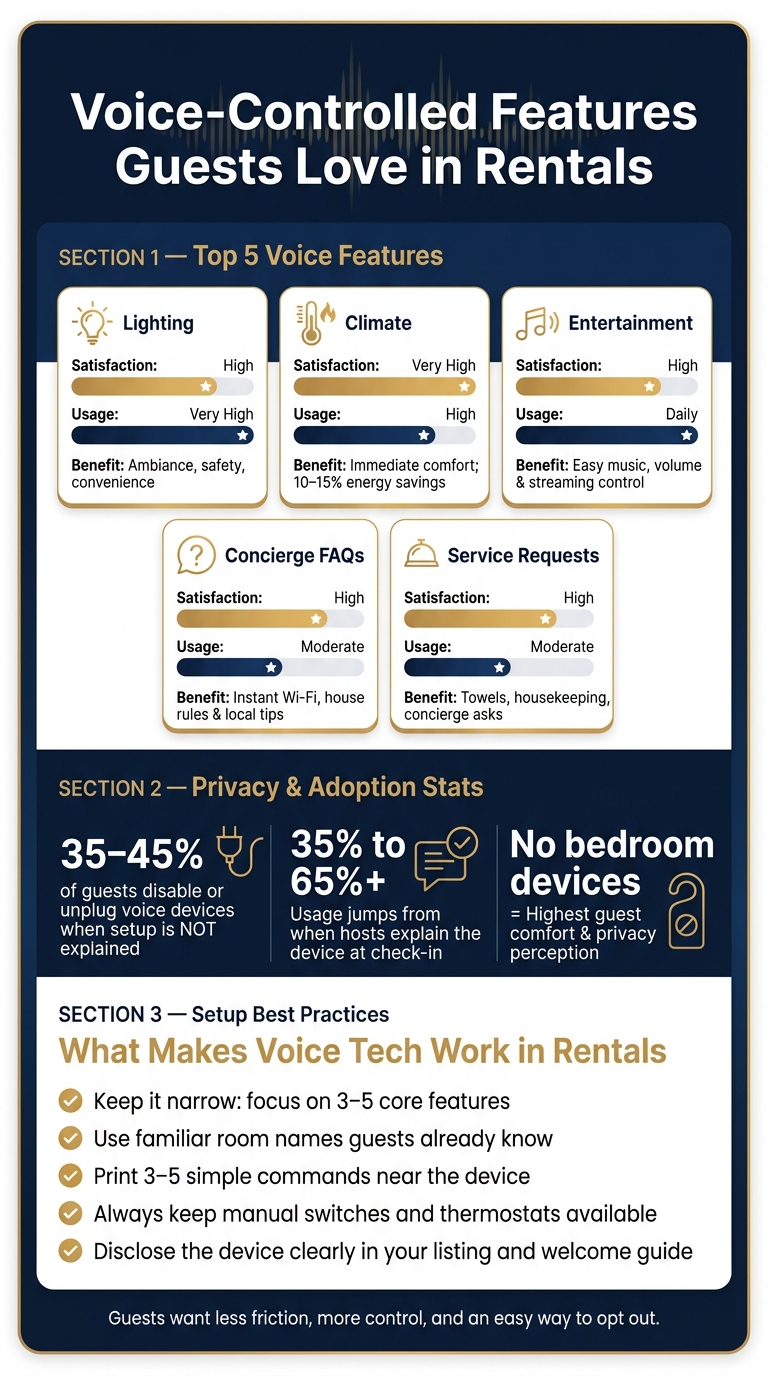
Voice-Controlled Features Guests Love in Rentals: Satisfaction, Usage & Privacy
BEST Smart Home Tech WHILE RENTING
sbb-itb-161ccc1
The Voice-Controlled Features Guests Value Most
These are the voice features guests use the most – and the ones they tend to like the most.
| Feature | Guest Satisfaction | Usage Frequency | Reported Benefits |
|---|---|---|---|
| Lighting | High | Very High | Ambiance, safety, convenience |
| Climate | Very High | High | Immediate comfort; 10% to 15% energy savings |
| Entertainment | High | Daily | More polished experience; easy music and streaming access |
| Concierge Info & Service Requests | High | Moderate | Instant access to Wi-Fi, house rules, and local recommendations; fewer routine host questions |
Comfort controls score highest on satisfaction. But the features guests use every day are what make voice systems feel worth having across an entire stay.
Lighting and Climate Controls Top the List for Comfort
Lighting and climate controls get the strongest guest response because they fix the most immediate comfort problems. Voice control means guests don’t have to hunt for light switches in the dark or figure out a thermostat they’ve never seen before.
In larger U.S. luxury rentals, multi-zone climate control matters even more. Guests can set different temperatures in different parts of the home, which makes the stay feel smoother and more personal. Scene commands help too. A single request can dim the lights, close the shades, and change the temperature at the same time.
After comfort controls, entertainment is the feature guests use most often.
Entertainment Features Get the Most Daily Use
Entertainment gets the most day-to-day use. Guests use voice commands to play music, change TV volume, and open streaming services more often than any other feature during a stay. That kind of repeated use makes voice control feel like part of the experience, not just a flashy add-on.
When someone can start music and set the lighting with one command, the property feels more polished.
Voice control also helps with something less glamorous, but just as useful: cutting down routine guest questions.
Concierge Information and Service Requests Add Practical Value
That day-to-day help matters most when guests want a fast answer or an easy way to ask for something. Voice assistants can answer questions about Wi-Fi passwords, check-out times, house rules, and local recommendations.
Guests tend to prefer assistants that do a small set of high-use jobs well: temperature, lighting, FAQs, music, and service requests. Voice-based requests – like asking for extra towels, scheduling housekeeping, or reporting a maintenance issue – add another layer of convenience when paired with concierge follow-through. For Essentialyfe properties, that can also include concierge requests such as private chefs, shuttle coordination, and in-home massages.
Privacy, Trust, and Usability in Guest Feedback
Guests use voice control when it feels private, clear, and easy. Even the most liked features can fall flat if the device seems intrusive or hard to use. In many cases, privacy concerns decide whether a guest uses the assistant at all.
Clear Disclosure and Easy Mute Options Build Guest Comfort
If hosts don’t explain the device upfront, 35% to 45% of guests disable or unplug it. When hosts do explain it during check-in, adoption goes up. In one reported case, usage rose from about 35% to more than 65%.
Guests want a plain explanation of what the device does, when it listens, and how to mute it. A mention in the listing description and welcome guide helps remove the surprise factor. A visible physical mute switch or an easy unplug option also gives guests a stronger sense of control.
That privacy clarity is what makes the comfort and concierge features usable in the first place.
The table below summarizes the pattern in guest feedback:
| Setup Type | Guest Comfort | Privacy Perception | Setup Complexity |
|---|---|---|---|
| Always on | Moderate | Low – concerns over recording/monitoring | Low (standard plug-and-play) |
| Muted by default | High | Moderate – trust built through control | Moderate (requires host to reset/mute between stays) |
| No bedroom devices | Highest | High – clear boundary for private spaces | Low (focuses tech in common areas only) |
Simple Setup Matters More Than Novelty
Guests want tech that stays out of the way. The setups that work best use familiar room names, print 3 to 5 commands, and keep the system focused on common tasks.
In practice, that usually means sticking to a short list:
- Lighting
- Climate
- Music
- Local FAQs
- Service requests
This works better than trying to make the assistant do everything. And voice should stay optional, not forced. Keep wall switches and thermostat controls available so guests can use the room the normal way if they want.
These trust and ease-of-use choices matter just as much as the features themselves.
What These Findings Mean for Luxury Rental Owners and Managers
These guest preferences matter most when they cut staff interruptions and speed up service. In a luxury rental, voice tech earns its spot when it removes friction and backs up service, not when it tries to be the star of the show. For owners and managers, that means choosing features with care and tying each one to a clear guest need.
Features That Support High-End Service Delivery
Voice assistants do their best work when they reduce repeat tasks, not when they feel like a gimmick. For owners running a high-end rental, that means putting the focus on the features guests already use most.
For owners, the main question isn’t what voice can do. It’s which functions guests actually use. The table below links each core voice feature to its day-to-day service value, premium fit, and main setup need:
| Feature | Service Benefit | Luxury Relevance | Setup Consideration |
|---|---|---|---|
| Climate & Lighting | Hands-free comfort from bed or on arrival | High – supports an easy, polished atmosphere | Requires smart hub or BMS integration |
| Concierge FAQs | Instant answers to property and local questions | High – cuts wait times for simple info | Requires quarterly content updates |
| Service Requests | Easy ordering for towels, spa, and similar needs | Very High – speeds up guest service | Must integrate with ticketing or POS system |
| Entertainment | Smooth music and TV control | Medium – expected baseline amenity | Best handled via Chromecast or Spotify |
One practical point on upkeep: the voice assistant’s information – pool hours, service menus, checkout instructions – should be treated like a guest knowledge base and updated at least quarterly. If those answers are out of date, guests get annoyed fast, and the premium feel starts to slip.
How Essentialyfe Can Apply These Findings
At Essentialyfe properties, this setup works best when voice handles routine requests without pulling staff away from higher-touch service. Voice tools can answer common questions like Wi-Fi, checkout time, and trash instructions without staff stepping in each time. For event venues and film locations, lighting and climate presets triggered by a single voice command can line up the space for different setups. And for guests using concierge amenities, a voice-linked service request system lets them place requests the second they think of them. That keeps service fast and the stay smooth.
Conclusion: The Voice Features That Deliver the Most Guest Value
Survey feedback and usage patterns point in the same direction: guests like voice control when it cuts the hassle out of everyday tasks. They don’t want a gadget that begs for attention. They want something that helps them do simple things with less effort. Across the studies, the pattern is clear: the best features remove friction, not attention.
The top value areas are lighting and climate control, entertainment, concierge information, and service requests. But there’s a catch: privacy controls shape whether guests use those features at all.
Trust matters just as much as convenience. Privacy is a big part of adoption. Guests are more likely to use voice tech when the device is clearly disclosed, easy to mute, and doesn’t force them to set up extra accounts or download apps.
As Gordon van Zuiden, Founder of Daisy, put it:
"Visitors expect a comfortable, enjoyable and hassle-free stay. There’s no room for error… [Voice control] provides a simple way, no matter the user’s comfort level with technology, to adjust the temperature, music, security and settings."
A voice assistant that does a small set of tasks well will beat a packed system that fails too often. For owners, the takeaway is simple: put utility ahead of novelty. The best systems stay narrow, reliable, and easy to override.
FAQs
Which voice features should hosts set up first?
Start with the features guests will use most: lighting and temperature controls through a smart speaker.
A smart thermostat and automated lighting make the stay easier and more comfortable. They can also help cut energy use. Add simple instructions to the digital welcome book so guests can get set up without any hassle.
How can hosts address guest privacy concerns?
Hosts should put clear disclosure and guest control first. List every smart device in the property description and in the welcome guide, so guests know exactly what’s there before they book and when they arrive. And one rule should be non-negotiable: never put microphones or cameras in private spaces like bedrooms or bathrooms.
Guests should also have an easy way to turn devices off. That can be as simple as a physical switch or letting them unplug the device. Muting microphones between stays or using privacy-focused settings can also help protect anonymity and security.
Where should voice devices be placed in a rental?
Place voice devices in main living areas and other shared spaces where guests tend to spend time, like the living room or next to entertainment systems. That way, they can control lights, temperature, and music hands-free without hunting for switches or remotes.
Skip private spaces such as bedrooms and bathrooms. Also, make sure you clearly disclose any smart devices in your listing and welcome guide.