Fixed rates cost you money on busy dates and can leave nights empty when demand drops. I’d handle seasonal demand with four date bands, clear rate triggers, event premiums, minimum-stay rules, and a weekly review of ADR, occupancy, RevPAR, lead time, and length of stay.
If you run a luxury rental, event venue, or film location, the goal is simple: charge more when demand is hot, protect a floor when it slows, and keep pricing in line with the service level you deliver. The article’s core point is that a live pricing system beats broad seasonal pricing because it reacts to booking pace, occupancy, local events, remaining inventory, and days to arrival.
Here’s the article in plain English:
- I’d start with 24 months of data
- I’d split dates into Super-Peak, Peak, Shoulder, and Low
- I’d track vacation, event, and production demand separately
- I’d use occupancy and booking pace to change rates
- I’d add weekend premiums, event premiums, and minimum stays
- I’d set a price floor based on costs and a ceiling for top dates
- I’d use automation with manual overrides
- I’d review results weekly, monthly, post-season, and quarterly
A few numbers stand out:
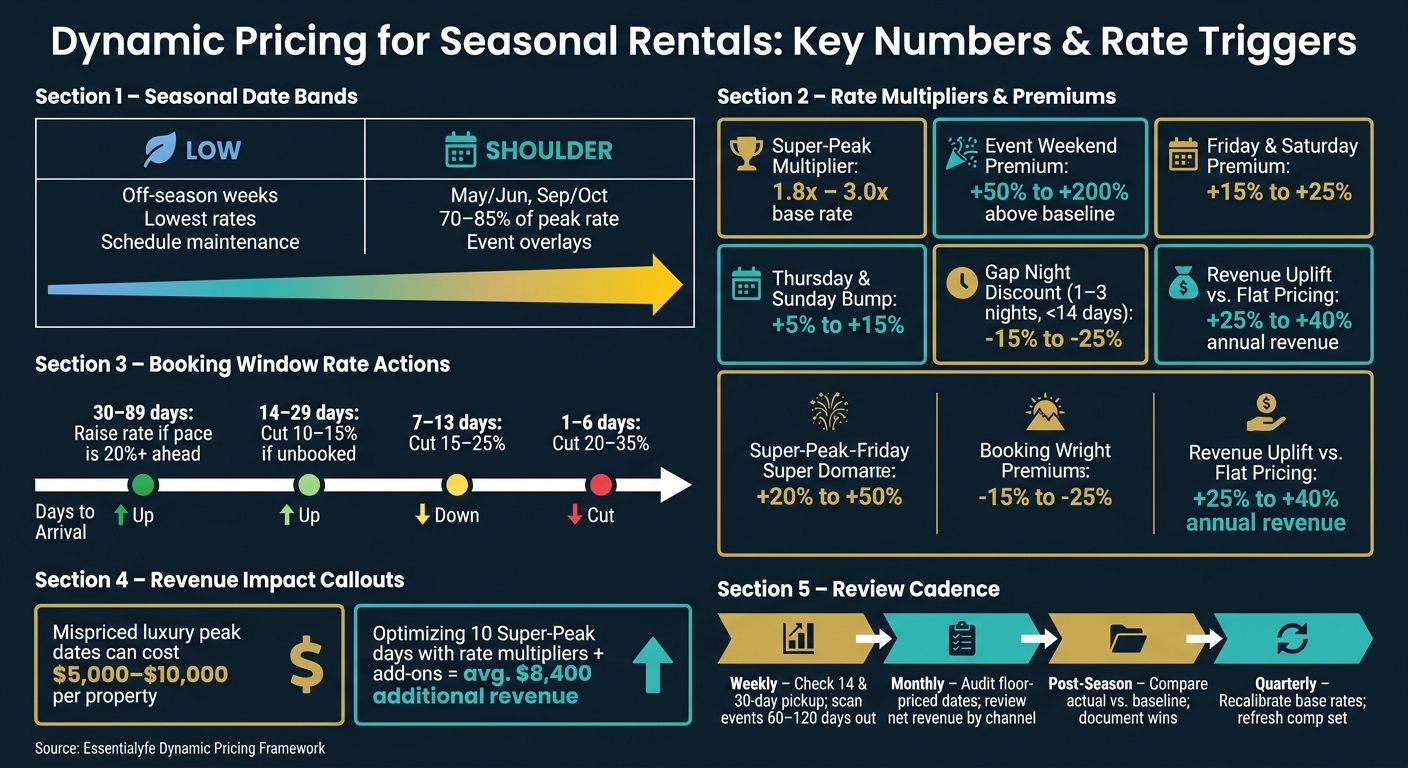
- Super-Peak dates may support 1.8x to 3.0x peak pricing
- Event weekends can push rates 50% to 200% above baseline
- Friday and Saturday often justify a 15% to 25% premium
- A 1- to 3-night gap within 14 days may need a 15% to 25% discount
- Better seasonal pricing can add 25% to 40% more annual revenue
- Mispriced luxury peak dates can cost $5,000 to $10,000 per property
| Focus Area | What I’d Do |
|---|---|
| Baseline | Pull 24 months of ADR, occupancy, RevPAR, lead time, and LOS data |
| Date bands | Group nights into Low, Shoulder, Peak, and Super-Peak |
| Rate triggers | Change pricing by occupancy level and booking pace |
| Event layer | Add premiums for festivals, sports, conferences, and holiday demand |
| Stay rules | Use longer minimum stays on busy dates, then relax them near arrival |
| Guardrails | Set floor prices from costs and cap top-end rates |
| Review cycle | Check pacing weekly and recalibrate by season |
The big takeaway: I wouldn’t treat seasonal pricing as a one-time calendar setup. I’d treat it like a rule-based system that changes with demand and gets tuned over time.
Dynamic Pricing for Seasonal Rentals: Key Numbers & Rate Triggers
5 Pricing Strategies Every Airbnb Host Should Use (Backed by Data)
sbb-itb-161ccc1
Build a Seasonal Demand Baseline
Before you set dynamic rules, you need a clear view of how the property has performed over time. That history becomes your pricing baseline.
Review Historical ADR, Occupancy, and Booking Window Data
Pull 24 months of weekly data and track ADR, occupancy, RevPAR, lead time, and length of stay.
Lead time tells you how each season tends to book. Some periods fill far in advance. Others come together late. You should also watch for patterns around repeat events, where booking behavior can look very different from standard seasonal travel.
Map Peak, Shoulder, Low, and Super-Peak Dates
Once your data is sorted, group the calendar into clear tiers. A simple high/low split leaves money on the table because it skips the middle ground. A better setup uses four bands:
| Season Tier | Typical Drivers | Pricing Strategy |
|---|---|---|
| Super-Peak | July 4th, New Year’s Eve, Super Bowl, major local festivals | 1.8x–3.0x base rate; 3-night minimums |
| Peak | Summer beach season, ski season, Spring Break | Base peak rate; weekend premiums |
| Shoulder | May/June, September/October | 70%–85% of peak rate; event overlays |
| Low | Post-holiday lull, off-season weeks | Lowest rates; schedule maintenance |
From there, turn the metrics into rate bands. Mark Super-Peak dates at least 90 days in advance. Start with Memorial Day, Fourth of July, Labor Day, Thanksgiving, Christmas, and New Year’s Eve. Then add local demand drivers, like major conferences, college football games, and regional festivals.
In most major markets, there are usually 15–20 event weekends per year that support meaningful rate premiums.
Separate Vacation, Event, and Production Demand
Not all demand behaves the same way. The same property can follow very different booking curves depending on why someone is reserving it.
Vacation demand usually follows seasonal patterns. Event demand is tied to fixed calendar dates. Production and monthly demand tend to follow work schedules instead.
That means production and monthly stays need their own baseline. Build that baseline around furnished monthly comps, then add a premium for utilities and furnishings.
Luxury vacation, event, and production bookings also need separate baselines because each segment moves on its own curve.
Use these baseline bands to set the rate changes, premiums, and minimum-stay rules that come next.
Set Dynamic Pricing Rules That Respond to Demand
Turn each seasonal band into a pricing rule with a clear trigger and action. Apply those rules across peak, shoulder, low, and super-peak dates, using the baseline bands from the previous section as the trigger source.
Use Occupancy and Booking Pace to Raise or Lower Rates
The two triggers you can count on most are occupancy thresholds and booking pace.
When a date range hits 30% occupancy, bump the rate by a set amount. When it passes 60%, bump it again. That simple setup helps you avoid underpricing nights as demand starts to build.
Occupancy tells you how full you are. Booking pace tells you how fast those nights are filling. You need both.
Early bookers will often pay more to lock in peak dates. On the flip side, if a date range is lagging, lead time should kick off selective discounts instead of broad cuts across the calendar.
Use these booking-window triggers:
| Days to Arrival | Action |
|---|---|
| 30–89 days | Raise rate if booking pace is more than 20% ahead of pace for that date range |
| 14–29 days | Cut 10%–15% if still unbooked |
| 7–13 days | Cut 15%–25% |
| 1–6 days | Cut 20%–35% |
There’s one case that deserves its own rule: a 1- to 3-night gap within 14 days of arrival. For those small openings, apply a 15%–25% discount to fill nights that would otherwise go unsold.
Add Event Premiums, Weekend Differentials, and Minimum Stays
Local events need their own pricing layer on top of the seasonal baseline. Big festivals, sports weekends, and conferences can push rates 50%–200% above the standard baseline.
Weekend pricing should follow demand, too:
- Add a 15%–25% premium for Friday and Saturday nights compared with Sunday through Thursday
- Add a smaller 5%–15% bump for Thursday and Sunday nights
But price changes alone won’t do the job. Stay rules matter just as much.
During high-demand periods, a 4–7 night minimum stay helps block weekend-only bookings that leave awkward midweek gaps behind. Then, as arrival gets closer and open nights are still sitting there, loosen that minimum to fill what’s left.
That tradeoff can pay off. A 7-night booking at a 20% discount can bring in more total revenue than a 3-night booking at full price, since turnover costs – cleaning, linen, and restocking – are spread across more nights.
Set Price Floors, Ceilings, and Service Add-Ons
Set your price floor by taking monthly fixed costs, dividing them by your target occupied nights, and adding a 20%–30% margin. Your automated rules should never drop below that number.
At the top end, cap rates at 1.8x–3.0x the standard peak rate for Super-Peak dates. That keeps pricing in check, protects brand positioning, and helps avoid rates that chip away at guest trust over time.
And don’t treat the nightly rate like your only tool.
When demand can support premium pricing, grow total booking value with bundled services instead of leaning only on the room rate. For Essentialyfe properties, that can include private chefs, in-home massages, security, shuttle service, and concierge support.
Optimizing just 10 Super-Peak days per year through a combination of rate multipliers and add-on bundling can generate an average of $8,400 in additional revenue.
Once those rules are in place, move them into your pricing calendar and track how they perform by season.
Put the Pricing Strategy Into Practice
Once your rules are in place, build them into your pricing system and set a weekly review rhythm.
Configure Seasonal Calendars and Automated Rules
Start by loading your seasonal rate bands into your property management system (PMS) or pricing tool. From there, automate daily rate updates and line up the calendar with staffing capacity and service limits.
That said, not everything should be left on autopilot. Keep manual overrides in place for VIP bookings and special event windows.
Coordinate Pricing with Operations and Guest Services
Pricing has to match what your team can actually deliver. Higher Super-Peak rates often bring faster turnover, more housekeeping pressure, and heavier concierge demand.
For Essentialyfe properties, this matters even more. Premium bookings need to be synced with concierge and event services so the team can be scheduled and confirmed before the reservation is finalized.
Use hard calendar blocks for:
- Maintenance windows
- Deep cleans between long stays
- Staff availability caps
Also document what each rate tier includes and share those details with reservations and guest services. That way, every team works from the same rate and service information.
Choose the Right Level of Pricing Automation
Choose the automation level that fits your portfolio size, staffing, and how much brand control you want to keep.
| Automation Level | Control Level | Effort Required | Responsiveness | Best Fit |
|---|---|---|---|---|
| Manual | Total | Very High | Low | Single properties or very small portfolios |
| Semi-Automated | High | Moderate | High | Luxury portfolios that still need human oversight for events |
| Fully Automated | Low | Low | Very High | Large portfolios prioritizing efficiency and RevPAR |
For most luxury rental and event portfolios, semi-automated pricing is the best place to start. You get daily rate updates without losing control over brand standards, VIP requests, or event windows.
Even with automation, someone still needs to watch the numbers. A weekly 30-minute review helps you track booking pace, spot missed events, and adjust rates before small issues turn into bigger ones.
Track Results and Refine the Strategy
Once your rules are live, compare actual results against your baseline and make changes fast. The baseline and pricing bands you already set give you a clear way to judge what’s working and what isn’t.
Measure ADR, RevPAR, Occupancy, and Length of Stay by Season
RevPAR is the best single metric here because it balances rate and occupancy. $105 RevPAR at 75% occupancy and $140/night beats $95 RevPAR at 95% occupancy and $100/night. For luxury properties, that difference matters. A fuller calendar can mean more wear and tear without better revenue performance.
Average length of stay is another smart check. Longer stays can suggest that your pricing or minimum-stay rules are pulling in more efficient bookings and cutting turnover costs. Median booking lead time and pacing help too, since they show whether guests are booking earlier or later than expected.
Track vacation, event, and production stays separately. If you lump them together, you can miss which segment is lifting ADR, occupancy, or length of stay.
Use these numbers to decide what to change next:
- A higher floor
- A tighter or looser minimum stay
- A premium on high-demand dates
Adjust Seasonal Bands and Rules Based on Actual Performance
If occupancy is high but ADR is soft, move the price floor up. If occupancy stays below 65% even after discounts, take a hard look at both pricing and listing quality.
A simple review table helps keep the process steady:
| Review Cadence | Key Actions | Primary Metrics |
|---|---|---|
| Weekly | Check pickup for the next 14 and 30 days; scan for event windows 60–120 days out | Pacing, Lead Time |
| Monthly | Audit floor-priced dates; review net revenue by channel | Occupancy, ADR, RevPAR |
| Post-Season | Compare actual vs. baseline; document what worked | Actual vs. Baseline |
| Quarterly | Recalibrate base rates and seasonal bands; refresh comp set | RevPAR Index, Market Share |
Del Carmen Hospitality in Miami moved from static pricing to active revenue management and increased RevPAR by 21% in month one and 36% in month two. Its booking window also doubled, from 7.8 days to more than 16.
Change one variable at a time, then give it at least two weeks before you judge the result.
That turns the review cycle into part of revenue management instead of a one-off cleanup.
Conclusion: A Simple System for Stronger Seasonal Revenue
Dynamic pricing is not a one-time setup. It’s a discipline that builds over time. Start with a solid seasonal baseline, apply clear rules tied to demand signals, automate the parts that fit your portfolio size, and review results on a steady cadence.
Properties using sophisticated seasonal pricing can earn 25%–40% more annual revenue than those using flat pricing or basic adjustments. For luxury rental and event portfolios like those managed through Essentialyfe, that kind of consistency is often the difference between strong seasonal revenue and missed opportunity.
FAQs
How do I set my base rate?
Start by looking up the median nightly rate for similar luxury rentals in your market over the past 90 days. Focus on places with a similar bedroom count and matching amenities, so you’re comparing apples to apples.
Then set your base rate within 10% to 15% of that median, unless your property clearly earns a higher price. From there, dynamic pricing can respond to demand, while you stay in control with pricing floors and rule-based limits.
When should I override automated pricing?
Override automated pricing when professional judgment should take the lead, especially for high-demand opportunities or tighter revenue guardrails.
Use manual or rule-based overrides to:
- set firm minimum price floors for local events, festivals, or holidays
- adjust pricing when market pacing slips behind expectations
- fill orphan calendar gaps with targeted last-minute discounts
- keep rates above operating costs
What metrics matter most each week?
Track the Big Three each week: Occupancy Rate, Average Daily Rate (ADR), and Revenue per Available Rental (RevPAR). Those three numbers give you the clearest view of how your rental is doing.
It also helps to watch booking pace, your local event calendar, and net revenue. That way, you can spot shifts in demand early, adjust rates at the right time, and protect your profit.