Coordinating a film crew requires careful planning, clear communication, and efficient scheduling. With crew expenses often consuming 40–60% of a production budget, every second counts. Poor coordination leads to delays, budget overruns, and logistical headaches. Here’s how to manage film crews effectively:
- Preparation: Break down scripts using the 1/8th page rule, tag all required elements (actors, props, equipment), and create detailed scene breakdowns. Tools like StudioBinder simplify this process and reduce errors.
- Scheduling: Group scenes by location to save time, prioritize challenging scenes early, and respect union rules for rest periods and meal breaks. Use software like StudioBinder or Shoflo for real-time updates and precise scheduling.
- Communication: Establish a clear hierarchy, standardize radio protocols, and use tools like Slack or Discord for department-specific channels. Visual aids and daily meetings align teams quickly.
- Task Delegation: Assign work through department heads and use project management tools like Trello or Asana to track progress. Focus on outcomes rather than micromanaging.
- Conflict Resolution: Address issues privately and promptly, ensuring professionalism and maintaining morale. Allocate buffer days for unforeseen delays.
- Luxury Locations: Choose production-ready properties with essential features like power access, staging areas, and vendor lists. Platforms like Essentialyfe streamline location management.
Efficiency on set boils down to preparation, communication, and smart use of tools. By following these practices, productions can stay on budget and meet tight deadlines.
Preparation: Getting Ready Before Filming Starts
Analyzing the Script
Start with a read-through of the script to understand its visual and emotional flow. This step helps you grasp the story’s essence while identifying key elements. Next, check the formatting: ensure scene headers (INT/EXT), time of day (D/N), and character names are consistent. This level of uniformity is crucial for scheduling software to work smoothly.
The 1/8th page rule is a standard tool for estimating time. Each page of the script is divided into eight 1-inch sections, with one full page roughly equaling one minute of screen time. Using this, you can estimate shooting time accurately. For context, major studio productions typically shoot 1–2 pages per day, television dramas manage 5–8 pages, and independent films often handle 10 or more pages daily.
Element tagging is another critical step. This process identifies everything needed for each scene – actors, props, stunts, vehicles, and special equipment. Go beyond what’s explicitly written. For example, if a scene mentions a remote control, you’ll also need batteries. Similarly, if a character tears down a curtain, it’s classified as a prop requiring coordination, but if they just close it, it’s considered set dressing.
After analyzing the script, create detailed scene breakdowns to guide each department’s planning.
Making Scene Breakdown Sheets
"A scene breakdown is a comprehensive list of what has to be thought about and obtained for the words on the page to become a scene in a movie." – StudioBinder
Scene breakdowns transform your script analysis into actionable reports for each department. These sheets are essential for budgeting and scheduling, as they spotlight costly requirements before you finalize shoot dates.
Modern tools like StudioBinder or Movie Magic Scheduling simplify this process. They generate reports and update Day-Out-of-Days (DOOD) documents automatically when scenes are rearranged. This automation reduces errors often found in manual methods like spreadsheets or physical stripboards. For example, the prop master gets a precise list of items, the wardrobe department knows which costumes are needed, and the VFX team is aware of the shots requiring their expertise.
For complex elements like stunts or visual effects, tag the entire process as one element, then let specialists break it down further. For instance, animal trainers typically charge $600 to $1,000 per day, excluding the animal’s cost. Flagging such details early helps with budgeting.
These breakdown sheets form the backbone of an efficient shooting schedule.
Planning the Initial Schedule
When scheduling, prioritize production efficiency over story order. Group scenes by luxury venues or locations to save time and money. Moving the entire crew between locations – known as a company move – can take 30 to 90 minutes per move.
"A shooting schedule that is organized efficiently can shave days off a shoot, saving tens of thousands of dollars on a low-budget indie or hundreds of thousands on a studio project." – Saturation.io
Arrange actor scenes to minimize downtime and avoid unnecessary hold days, which can be expensive. Most union productions allow for 10 to 12 hours of work per day, with mandatory 8 to 12-hour rest periods (turnaround) between shoot days.
Plan exterior scenes for natural light, but always have interior sets ready as backups in case of bad weather. If your script calls for "magic hour" lighting at sunset, remember this window only lasts 45 to 60 minutes. Avoid scheduling critical scenes on the first day, as the crew needs time to get into a rhythm.
sbb-itb-161ccc1
Communication: Setting Up Clear Channels
Setting Communication Rules
On a film set, a well-defined hierarchy ensures everything runs smoothly. The Director and 1st Assistant Director (AD) provide guidance to Department Heads, who then pass on clear, conflict-free instructions to their teams. This structured communication is essential for assigning tasks and staying on schedule.
Establishing standardized radio etiquette is crucial. When using walkie-talkies, crew members should wait about a second after pressing the "push-to-talk" button to avoid cutting off the beginning of their message. Universal terms like "Over" (finished speaking, awaiting a reply), "Roger" (message understood), and "Say Again" (please repeat) help keep conversations clear. For technical codes or names, using the international phonetic alphabet – like Alpha, Bravo, Charlie – reduces misunderstandings.
To avoid cross-talk, assign specific radio channels to different departments. For instance, Grip, Electric, and Camera teams can each operate on their own channel, ensuring discussions stay relevant. You can also use discreet color-coded phrases, such as "Code Red" for emergencies or "Code Gold" for talent arrivals, to communicate with only the necessary crew members.
During filming, when maintaining clean audio is critical, non-verbal communication takes center stage. Universal hand signals allow the crew to coordinate without disrupting sound recording. For teams with diverse backgrounds, supplement verbal instructions with visual aids or demonstrations to ensure everyone is on the same page. Additionally, holding a quick 15-minute meeting each morning can help align expectations and address any immediate concerns before the day begins.
These practices build a strong foundation for integrating digital tools to enhance real-time communication.
Using Digital Communication Tools
Once verbal protocols are in place, digital platforms can streamline coordination even further. They act as a centralized hub, preventing important details from getting lost in scattered text messages or unrecorded phone calls. Apps like Slack or Discord allow you to create department-specific channels – such as Camera, Sound, or Logistics – so crew members only see updates relevant to their roles.
Real-time messaging is invaluable for handling last-minute changes, like location adjustments or script updates, ensuring the entire crew is notified at once. Platforms such as StudioBinder or Rentman can distribute digital call sheets and packing lists, so everyone knows where to be and what gear to bring. These cloud-based tools are mobile-friendly, allowing crew members to review storyboards or scripts wherever they are.
Sharing visuals – like photos of equipment setups or blocking diagrams – within messaging apps can be particularly useful for multilingual teams, as it minimizes reliance on text-heavy instructions. Linking scheduling tools with chat functions ensures that scene changes automatically alert the right departments.
Between January and July 2024, there was a 106% rise in invitations sent to crew members for productions. This surge highlights the increasing complexity of managing film sets. Digital tools help by tracking tasks, deadlines, and completion statuses in real time. Adding feedback channels or anonymous suggestion boxes within these platforms can also pinpoint communication challenges and improve workflows for future projects.
Task Delegation: Assigning Work to the Right People
Working with Department Heads from the Start
Delegating tasks effectively starts with a well-defined chain of command. The Director handles the creative vision – things like performance and shot composition. Meanwhile, the 1st Assistant Director (1st AD) takes charge of operational tasks, ensuring the production stays on schedule. For example, if the lighting needs adjustment, the Director relays their vision to the Lighting Director, who then assigns specific tasks to the Grips. This structure keeps communication clear and ensures everyone knows exactly who to report to.
Getting department heads involved early is crucial. They can prepare lighting setups, prop lists, and equipment requirements before filming even starts, avoiding last-minute chaos. When working with seasoned department heads, focus on describing the desired outcome rather than micromanaging the process. As Film Connection puts it:
"Crew members can get their revenge any time they want by following your directions to the letter. A better way to go about it is to tell them the effect you want to achieve, then let them do it using their expertise".
For less experienced crew members, however, it’s helpful to provide clear guidance on techniques and positioning upfront.
The 1st AD functions as the logistical leader, managing daily operations, while the Line Producer oversees the budget and schedule. Production coordinators, earning about $45,000 annually or $25 per hour, play a key role in keeping everything organized. Providing concise and clear instructions minimizes delays and helps maintain the precise scheduling and communication strategies that are vital to a smooth production.
Applying Project Management Software
Once tasks are delegated, digital tools can simplify tracking and coordination across departments. Platforms like StudioBinder, Trello, and Asana allow you to assign tasks based on department and urgency. StudioBinder emphasizes the importance of such tools:
"Professionals use production software… Why wouldn’t you? Trying to run a production office on a series of Word documents is a recipe for disaster, as is trying to balance tasks in your head".
Film-specific tools like Shoflo help align shooting schedules across departments, reducing errors like mismatched crew or misplaced equipment. Advanced platforms such as Rentman integrate crew scheduling with warehouse inventory, ensuring that every team member has the necessary tools and resources when they arrive on set. Additionally, shared cloud folders like Dropbox or Google Drive can house permits, insurance documents, and production reports, making them accessible to producers anytime. This digital organization, often referred to as a "wrap binder", not only enhances accountability but also helps track time losses.
Best Advice For Managing A Film Crew – James Kicklighter
Scheduling: Making the Most of Time and Resources
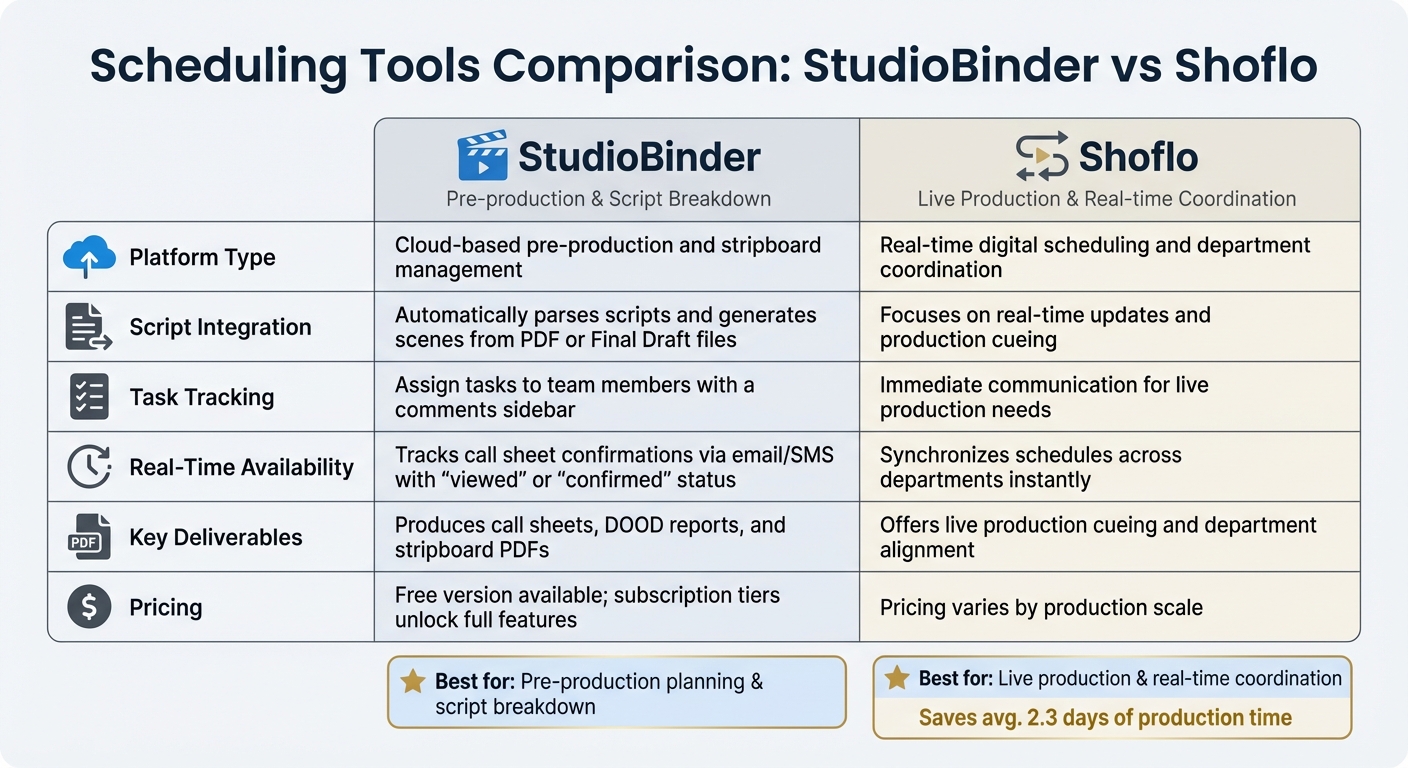
StudioBinder vs Shoflo Film Scheduling Software Comparison
Once tasks are delegated and communication is clear, the next step is creating an efficient shooting schedule to make the best use of time and resources.
Building a Complete Shooting Schedule
Start by using the script breakdown as your foundation. The 1/8th page rule, discussed earlier, is a reliable way to estimate scene lengths and shooting times.
To save time, consider block shooting. Group scenes by location to avoid lengthy and expensive company moves, which can take anywhere from 30 to 90 minutes per transition. Within each location, group shots that share similar camera setups to minimize equipment adjustments. Plan to shoot your most challenging scenes early in the schedule when the crew is still fresh. This approach also provides a buffer for any delays [7,23].
Be strict about turnaround times to maintain morale and stay compliant with union rules. Allow at least 12 hours of rest between shifts, and schedule a full 24-hour turnaround when transitioning from night shoots to daytime. Include meal breaks every six hours to avoid penalties, and use DOOD reports to track actor workdays, reducing unnecessary hold days [7,22,24]. Keep in mind that workdays longer than 14 to 16 hours can lead to double-time pay [22,24].
A well-structured schedule ensures that every department can operate smoothly, boosting the overall efficiency of the production.
Scheduling Tools Comparison
Digital tools can take scheduling to the next level by offering precision and real-time updates. Below is a comparison of two popular options:
| Feature | StudioBinder | Shoflo |
|---|---|---|
| Platform Type | Cloud-based pre-production and stripboard management [7,22] | Real-time digital scheduling and department coordination [2,28] |
| Script Integration | Automatically parses scripts and generates scenes from PDF or Final Draft files [7,22] | Focuses on real-time updates and production cueing |
| Task Tracking | Assign tasks to team members with a comments sidebar | Immediate communication for live production needs |
| Real-Time Availability | Tracks call sheet confirmations via email/SMS with "viewed" or "confirmed" status | Synchronizes schedules across departments instantly |
| Key Deliverables | Produces call sheets, DOOD reports, and stripboard PDFs | Offers live production cueing and department alignment |
| Pricing | Free version available; subscription tiers unlock full features [7,22] | Pricing varies by production scale |
StudioBinder stands out for its ability to parse scripts automatically. You can drag and drop your script, and it instantly creates scene strips for your stripboard. It also allows you to reorder scenes by location, time of day, or page count for maximum efficiency. With Google Maps integration, you can assign locations directly and manage company moves. Plus, its free version makes it accessible to productions of all sizes.
Shoflo, however, shines in fast-paced environments where schedules change frequently. It keeps all departments updated in real-time, reducing the communication errors that often lead to delays – on average, saving around 2.3 days of production time [2,28]. This makes it an excellent choice for live or highly dynamic productions.
Conflict Resolution: Handling Problems on Set
No production is entirely free of conflicts. Whether it’s a disagreement between team members or tension from long workdays, addressing issues as they arise is essential to keeping things on track. Production managers often allocate about 20% of the total production time as "buffer days" to account for unforeseen delays and scheduling hiccups. However, resolving conflicts effectively can help you avoid dipping into this safety net, ensuring your production stays aligned with its original schedule.
Solving Issues Right Away
When conflicts arise, deal with them immediately – and privately. Never call someone out in front of the entire crew. Assistant Director Angela Tortu emphasizes this point:
"When somebody is chronically difficult or makes a serious mistake on set, never make a scene of it. No one should be treated like a punching bag, and broken in front others".
Instead, take the person aside for a one-on-one discussion. This approach not only preserves their dignity but also helps maintain the trust and morale of the entire crew.
Start by listening. Often, what seems like a bad attitude stems from stress, burnout, or simple miscommunication. Focus the conversation on how to meet production goals rather than dwelling on personal grievances. For recurring problems, involve the Unit Production Manager (UPM) or producer to handle the administrative aspects. If someone continues to disrupt the process despite multiple interventions, it may be necessary to remove them from the production to protect the team’s overall progress.
For disagreements between departments, bring in the 1st Assistant Director as a neutral mediator. This ensures clarity and keeps the shoot moving forward without unnecessary confusion. These immediate steps also reinforce the structured communication methods discussed earlier.
Staying Flexible When Plans Change
Conflicts aside, adapting to unexpected on-set changes is critical. Challenges like sudden weather shifts or equipment malfunctions require quick adjustments. Daily briefing meetings become essential for communicating last-minute updates about schedules, locations, or scene modifications. Using real-time tools like two-way radios and production cue software can help streamline these adjustments, keeping all departments on the same page.
Filming at luxury rental locations can also introduce unique challenges, such as strict on-site rules. To avoid delays, maintain open communication with site managers and prepare backup plans, like alternative cover scenes or adjusted shooting orders. The key is staying adaptable while ensuring the team remains focused on the shared goal: completing the production successfully.
Using Luxury Locations for Film Production
Opting for a film-ready luxury property can simplify production and help avoid on-set headaches. As a senior editor at Viral.Villas put it:
"In 2026, producers want less friction and more predictability. If you remove the paperwork, they’ll bring the cameras".
This focus on preparation aligns perfectly with efficient crew scheduling, cutting down on unexpected delays.
Selecting the Right Location
While visual appeal is crucial, practical logistics are what truly determine a successful shoot. Look for properties that come equipped with essential production features, such as 3-phase power, generator staging areas, load-in instructions with gate codes, and a staging map. A "production pack" that includes floorplans, drone footage, and Wi-Fi details is also invaluable.
Smooth equipment movement depends on adequate crew parking and truck access. In high-demand production hubs, luxury properties typically rent for $2,500 to $10,000+ per day, with security deposits ranging from one to three days’ rental fees. Platforms like Essentialyfe simplify the process by offering curated, production-ready locations that ease the coordination burden. Choosing such a property can significantly reduce logistical challenges, helping the crew stick to tight schedules.
Taking Advantage of On-Site Services
Beyond selecting the ideal location, making use of on-site services can further streamline production. Amenities like fully equipped kitchens allow catering teams to prepare hot meals on-site, ensuring compliance with union rules requiring meals every six hours. Dedicated areas for hair and makeup keep those departments running smoothly.
Many luxury properties also provide vendor lists featuring pre-approved local grips, caterers, and set builders. Additional services, such as private chefs, shuttle transportation, and on-site security – often available through Essentialyfe – help the crew stay focused on filming.
The demand for all-inclusive, film-ready properties is growing. For instance, WME’s 2026 signing of The Orangery underscores the appeal of properties offering packaged production services. Gated locations with controlled access not only protect high-profile talent and expensive equipment but also provide modular spaces that can be easily redressed for multiple scenes. This transforms luxury properties into efficient logistical hubs.
Conclusion: Main Points for Crew Coordination
Efficient crew coordination begins with careful preparation. This includes breaking down scripts using the 1/8th page rule, identifying every necessary element, and scheduling scenes based on production logic. Grouping scenes by location is another smart move, as it reduces the time and expense of unnecessary relocations.
Establishing clear communication channels and defining roles precisely are essential to avoid confusion on set. Each crew member, from the Director shaping the creative vision to the Producer managing the budget, needs to fully understand their responsibilities. Tools like radios and production software help maintain alignment, especially during high-pressure shoots. With communication in place, delegating tasks efficiently becomes the next priority.
Speaking of delegation, assigning tasks thoughtfully and sticking to realistic schedules ensures smooth workflows and keeps budgets intact. As noted by Saturation.io:
"A schedule that requires 10% overage to complete every day is not a schedule, it is wishful thinking".
Adding weather cover and contingency days to the schedule gives productions the flexibility to adapt to unforeseen challenges without derailing progress.
Flexibility matters. Addressing conflicts promptly, maintaining professionalism, and adapting to shifting plans are vital for keeping productions on track. Resolving issues as they arise prevents small problems from escalating into larger setbacks.
Finally, selecting production-ready luxury locations through providers like Essentialyfe can simplify coordination significantly. These curated properties come equipped with integrated services like power infrastructure, security, catering, and transportation, reducing administrative burdens. This allows crews to focus on the creative aspects of production. When preparation, communication, and scheduling come together seamlessly, productions are more likely to stay on budget and run smoothly.
FAQs
How do I choose the right crew communication tool for my shoot?
To find the best crew communication tool, look for features like real-time messaging, task tracking, and scheduling integration. Opt for tools specifically built for film production, as they can handle complex workflows, group chats, and unexpected changes with ease. Choose a platform that aligns with the size and demands of your production to keep coordination smooth and reduce the chances of miscommunication on set.
What’s the fastest way to build a realistic shooting schedule?
The fastest way to build a practical shooting schedule is by organizing scenes based on logic instead of their chronological order. Start by breaking down the script and grouping scenes by factors like location, actor availability, and technical requirements. From there, plan each shoot day with precision. This method saves time, avoids unnecessary delays, and keeps the production running efficiently.
How do I prevent company moves and location issues from wasting time?
To keep things running smoothly during company moves or when dealing with location changes, it’s crucial to plan ahead. Factor in realistic travel and setup times – typically around 30 minutes per location for smaller crews, but you’ll need more time for larger teams.
Here are a few tips to make transitions easier:
- Send breakout teams or talent ahead: This ensures key people can start setting up while the rest of the crew catches up.
- Use extra personnel: Assign production assistants (PAs) to handle load-ins and load-outs efficiently.
- Provide clear instructions: Include detailed call sheet notes and maps for remote locations to avoid confusion.
These strategies can help cut down on wasted time and keep your schedule on track.